
How to Complete a Social Media Audit
A Step by Step Checklist
Posting consistently does not necessarily mean your social media strategy is working.
A social media audit gives you a chance to look at your accounts as a whole, identify what is performing, find areas that need improvement, and make more informed decisions about what you should do next.
Use this social media audit checklist to evaluate your business's social media presence from the profile level all the way down to individual content performance.
Social Media Audit Checklist
1. List Every Social Media Account
Start by creating a list of every active social media account connected to your business.
Include:
☐ Facebook
☐ Instagram
☐ LinkedIn
☐ TikTok
☐ YouTube
☐ Pinterest
☐ X
☐ Any industry specific platforms
For each platform, record:
☐ Profile URL
☐ Username
☐ Follower count
☐ Posting frequency
☐ Last post date
☐ Account owner or administrator
This gives you a complete picture of where your business currently has a presence and helps identify accounts that may have been forgotten or abandoned.
2. Audit Your Profiles
Next, review how your business appears when someone visits each profile. Your content may be what brings someone to your page, but your profile can determine whether they follow, explore your content, visit your website, or move on.
Profile Information
Check that:
☐ Business name is correct
☐ Username is consistent with your brand
☐ Profile photo is current
☐ Cover or header image is current
☐ Business category is correct
☐ Address is correct
☐ Phone number is correct
☐ Website link works
☐ Business hours are accurate
☐ Contact buttons work
Small inconsistencies can create confusion and make profiles feel outdated.
Profile Optimization
For personal brands, experts, and businesses where an individual is the face of the brand, review these five areas:
1. The Headshot
People connect with people. A clear, recognizable headshot can build familiarity and make the profile feel more personal.
Check:
☐ Is the person's face easy to see?
☐ Is the photo current and high quality?
☐ Does it fit the brand's overall image?
☐ Is it recognizable even at a small profile picture size?
2. The Name Field
On platforms like Instagram, the name field can help communicate what the account is about and improve discoverability.
Instead of only listing a name, consider adding a relevant niche, service, role, or specialty when appropriate.
Check:
☐ Does the name field clearly identify the person or business?
☐ Does it include a useful keyword or specialty when appropriate?
☐ Would someone unfamiliar with the account understand what the profile is about?
3. Who You Help
A new visitor should quickly be able to answer: “Is this for me?”The first line of the bio should make the intended audience and purpose of the account clear.
Check:
☐ Does the bio clearly explain what we do?
☐ Does it tell people who we serve?
☐ Can a new visitor quickly determine if the account is relevant to them?
4. The Proof
Anyone can make claims about their experience. Specific proof gives visitors more context for why they should trust the account.
Depending on the business, proof could include:
• Years of experience
• Customers served
• Measurable results
• Certifications
• Awards
• Recognizable clients or projects
• Other relevant accomplishments
Check:
☐ Does the profile provide a reason to trust our expertise?
☐ Can we support our claims with a specific result, credential, number, or accomplishment?
☐ Is the proof relevant to what our audience cares about?
5. The CTA
Do not make visitors figure out what they should do next. Give them a clear next step based on the goal of the account.
That could be:
• Follow for more
• Send a message
• Visit the website
• Schedule an appointment
• Request a quote
• Shop
• Download a resource
• Learn more
Check:
☐ Is there a clear next step?
☐ Does the CTA match the account's primary goal?
☐ Does the link or button connected to the CTA work?
Your Reels and other content may bring people to your profile, but the profile itself plays an important role in turning that attention into follows, messages, website visits, and leads.
3. Review Your Branding
Your social accounts should feel like they belong to the same business.
Review:
☐ Logo usage
☐ Brand colors
☐ Fonts
☐ Graphic styles
☐ Photography style
☐ Video style
☐ Messaging
☐ Tone of voice
The goal is not to make every post look identical. Instead, someone should be able to recognize your brand without needing to check the username.
4. Record Your Current Performance
Before making changes, establish a baseline.
Review the last 30 to 90 days and record the metrics available on each platform.
Audience Metrics
☐ Current followers
☐ New followers
☐ Unfollows
☐ Follower growth rate
Awareness Metrics
☐ Reach
☐ Impressions
☐ Video views
☐ Profile visits
Engagement Metrics
☐ Likes
☐ Comments
☐ Shares
☐ Saves
☐ Total engagements
☐ Engagement rate
Business Metrics
When available, also review:
☐ Website clicks
☐ Phone calls
☐ Messages
☐ Form submissions
☐ Leads
☐ Purchases or conversions
Do not evaluate success based on follower count alone. A smaller audience that regularly engages or takes action may be significantly more valuable than a large but inactive audience.
5. Identify Your Best Performing Content
Look at your top performing posts from the audit period.
For each one, record:
☐ Platform
☐ Post format
☐ Topic
☐ Reach or views
☐ Engagement
☐ Shares
☐ Saves
☐ Comments
☐ Clicks or conversions
Then look for patterns.
Were your strongest posts:
☐ Educational?
☐ Entertaining?
☐ Behind the scenes?
☐ Employee focused?
☐ Customer focused?
☐ Product or service focused?
☐ Short form video?
☐ Photos?
☐ Graphics?
☐ Testimonials?
☐ Trends?
The goal is not simply to identify your best post. You want to understand why it worked so those lessons can influence future content.
6. Identify Your Lowest Performing Content
Your weakest posts can be just as valuable as your strongest ones.
Review content with low reach, engagement, watch time, clicks, or conversions.
Ask:
☐ Was the opening strong enough?
☐ Was the topic relevant to our audience?
☐ Was there a clear purpose?
☐ Was the caption too long or too vague?
☐ Was there a call to action?
☐ Was the visual engaging?
☐ Did we use the right format for the topic?
☐ Are we repeatedly posting content our audience does not respond to?
Do not immediately stop using a topic because one post performed poorly. Look for repeated patterns before making major changes.
7. Review Your Content Mix
Now zoom out.
Look at everything you posted during the audit period and categorize it.
For example:
☐ Educational content
☐ Promotional content
☐ Brand awareness
☐ Team or culture
☐ Testimonials and reviews
☐ Community content
☐ Behind the scenes
☐ Products or services
☐ Engagement focused content
☐ Trends or entertainment
Ask whether your content has become too dependent on one category.
If nearly every post asks people to buy something, you may need more educational or awareness content. If everything is designed for entertainment but nothing explains your services, you may be missing opportunities to turn attention into business.
8. Audit Your Video Strategy
Video deserves its own section because views alone do not tell the entire story.
Review:
☐ Average video views
☐ Watch time
☐ Audience retention
☐ Completion rate
☐ Shares
☐ Saves
☐ Comments
Then evaluate the videos themselves:
☐ Is the topic clear immediately?
☐ Is there a strong opening hook?
☐ Is unnecessary footage removed?
☐ Are captions or on screen text readable?
☐ Is the video formatted correctly for the platform?
☐ Does the video provide a reason to keep watching?
☐ Is there a logical next step?
If viewers consistently leave during the first few seconds, the problem may not be the topic. The opening may simply need improvement.
9. Review Posting Consistency
Look at your posting history.
Ask:
☐ Are we posting consistently?
☐ Are there large gaps between posts?
☐ Are we posting too frequently without maintaining quality?
☐ Are certain platforms being neglected?
☐ Do we have a sustainable content schedule?
Consistency matters, but posting more is not automatically better. Your schedule should be realistic enough to maintain while still producing useful content.
10. Audit Stories and Highlights
Stories and profile highlights are easy to overlook.
Review:
☐ Are Stories being used consistently?
☐ Are we sharing useful updates through Stories?
☐ Are Highlights organized?
☐ Are Highlight covers consistent?
☐ Is outdated information removed?
☐ Do Highlights answer common customer questions?
Avoid automatically adding every feed post to a Highlight. Highlights should function as organized resources for profile visitors, not an archive of everything you have posted.
Useful Highlight categories could include:
• Services
• Reviews
• FAQs
• About Us
• Results
• Events
• Locations
11. Review Community Management
Social media should not be entirely one directional.
Audit how your business interacts with its audience.
☐ Are comments receiving responses?
☐ Are direct messages being answered?
☐ Are reviews acknowledged?
☐ Are questions answered promptly?
☐ Does the brand interact with relevant local or industry accounts?
☐ Are there opportunities to participate in conversations outside our own posts?
A strong social presence includes both publishing content and participating in the community around the brand.
12. Review Calls to Action
Look through recent posts and identify what you are asking people to do.
Common calls to action include:
☐ Visit the website
☐ Call the business
☐ Send a message
☐ Request a quote
☐ Schedule an appointment
☐ Comment
☐ Share
☐ Save the post
☐ Learn more
☐ Visit the business
Then ask:
Are we using the same call to action over and over?
Different content should have different goals. An educational Reel may be designed for saves and shares, while a service post may be designed to generate website visits or calls.
13. Compare Your Social Presence With Competitors
Choose three to five relevant competitors and review their social presence.
Compare:
☐ Follower counts
☐ Posting frequency
☐ Content formats
☐ Video usage
☐ Engagement
☐ Topics
☐ Offers
☐ Branding
☐ Calls to action
Pay particular attention to what their audience responds to.The purpose is not to copy competitors. Competitive research helps identify gaps and opportunities in your market.
Ask:
What could we provide that no one else in our space is doing particularly well?
14. Identify Missing Opportunities
After completing the audit, look for opportunities your current strategy is overlooking.
Examples could include:
☐ More short form video
☐ More educational content
☐ Customer testimonials
☐ Employee features
☐ Frequently asked questions
☐ Behind the scenes content
☐ Local community engagement
☐ Stronger calls to action
☐ Better profile optimization
☐ More consistent posting
☐ More user generated content
☐ Improved response times
Do not try to fix everything at once.
Social Media Audit Scorecard
Give each area a score from 1 to 5.
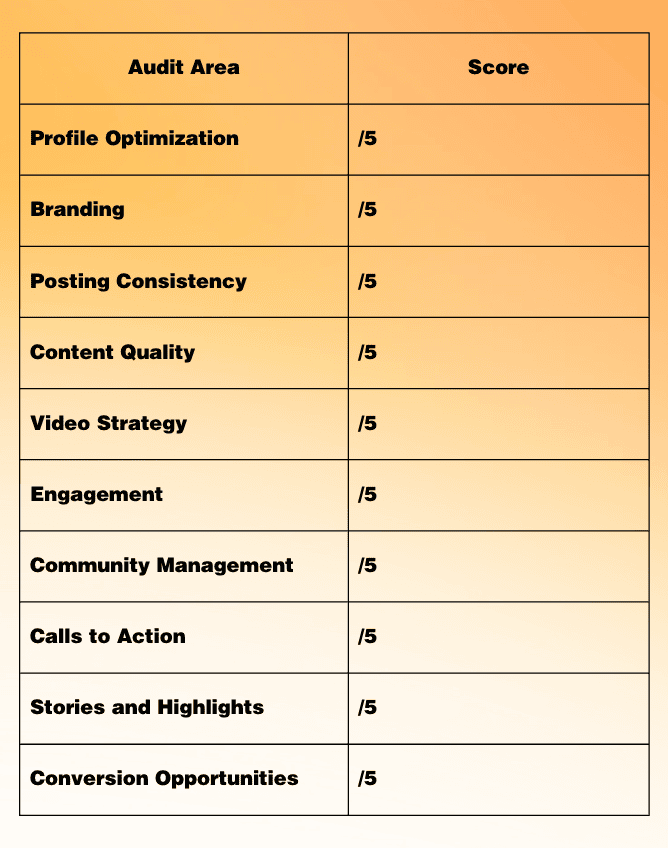
Total Score: ____ / 50
41–50: Strong Foundation
Your social presence is in good shape. Focus on testing, optimization, and finding opportunities to improve what is already working.
31–40: Good, With Opportunities
Several pieces are working, but there are clear areas where your strategy can become more intentional.
21–30: Needs Attention
Your business has a social presence, but inconsistent strategy or execution may be limiting performance.
20 or Below: Time for a Reset
Start with your profiles, content strategy, and measurement process before worrying about posting more frequently.
Turn Your Audit Into an Action Plan
A social media audit is only valuable if you use what you learn.
Once you complete your audit, identify:
1. 3 things to keep doing
2. 3 things to improve
3. 3 things to test
Then establish the metrics you will use to determine whether those changes are working.
Social media audits should not be a one time exercise. Completing an audit quarterly or at least a few times each year can help you identify changes in audience behavior, catch problems early, and continually improve your strategy.
The most important part is what happens after the audit: review the data, make changes, measure the results, and continue improving.
Need Help With Your Social Media Strategy?
Completing a social media audit is a great first step, but knowing what to do with the information is what makes the difference. At Myers Marketing Management, we help businesses turn social media insights into a strategy built around stronger content, better engagement, and measurable goals.
If your audit uncovered areas that need attention, our team can help you determine what comes next.